
SalesPad Mobile for dynamics gp
Bring Real-Time Insight Into the Field with SalesPad Mobile
SalesPad Mobile makes it possible to take your sales workflow everywhere your team sells (and where business often happens: in the field). From one mobile app, you can give reps, event staff, and offsite managers the power to check inventory, manage contacts, place orders, collect signatures, and accept payments in real time: on the go, from any phone or tablet.
Customer success story | PicnicTime
“More than a front end for GP,” SalesPad Mobile powers connected field operations for distribution.
As Picnic Time’s business grew, it needed faster order processing and mobile tools it could rely on in the field. When choosing SalesPad, Managing Partner Paul Cosaro highlighted that “the workflows are highly customizable, plus the ability to incorporate additional products, such as Inventory Manager and SalesPad Mobile, are what makes it stand out.”
Why SalesPad Mobile?
Keep Orders and Cash Flowing, From Wherever Your Team Sells
Dynamics GP holds your official sales, customer, and pricing records, but business moves throughout the day: across client sites, trade show booths, sales floors, and beyond.
SalesPad Mobile connects your field operations directly to Dynamics GP, putting full order-to-cash capabilities in your team’s hands. Sales reps, event staff, and mobile staff can check real-time inventory levels, quote verified pricing, and process orders on the spot: cutting out paper forms, eliminating re-entry errors, and accelerating the path to fulfillment. That looks like:
Eliminating duplicate entry and paper form reliance
Every handwritten order requires duplicate data entry that slows down fulfillment and introduces costly errors like transposed SKUs or incorrect pricing.
SalesPad Mobile generates orders directly in your system, bypassing manual re-keying and routing documents straight into your active workflow from the field.
Quoting live inventory and tiered pricing accurately
Selling items without visibility into warehouse stock leads to unexpected backorders, cancelled orders, and inevitably, frustrated customers.
SalesPad Mobile gives reps instant access to your item catalog (complete with multi-warehouse availability, customer-specific pricing, and quantity breaks), so they only commit to what can ship at that moment.
Tying field payments and signatures directly into the order
Unlinked cash, checks, or paper forms create hours of reconciliation headaches for back-office accounting teams.
SalesPad Mobile acts as a mobile point-of-sale, letting your team swipe credit cards via PayFabric by Global Payments or Square, and capture digital signatures directly on the sales document: all before leaving the customer site, not after the fact.
For faster, connected field sales
On-the-Go Order Entry and CRM, In the Palm of Your Team’s Hands
For distributors, field sales often means paper order pads, outdated price sheets, and calls back to customer service just to check inventory (yet again). The everyday reality looks like scribbling down orders, transposing part numbers, and handing off paperwork for someone in the office to re-enter into Dynamics GP later. And it slows down fulfillment in addition to creating expensive backorders, and leaving customers waiting on answers.
SalesPad Mobile eliminates the paper trail with real-time order entry, live inventory lookups, and on-the-spot payment processing (Note: payment processing requires PayFabric by Global Payments or Square as an add-on). Plus, every transaction flows right into Dynamics GP, whether you use SalesPad Mobile standalone or alongside SalesPad.
The Challenge
Mobile order entry & quoting
Writing orders on paper keeps reps from closing deals faster. There is no way to verify item availability across warehouses, no automatic customer-specific pricing, and nothing preventing a rep from selling out-of-stock items until it’s too late.
How SalesPad mobile Solves it
Close deals from anywhere
Comprehensive order management
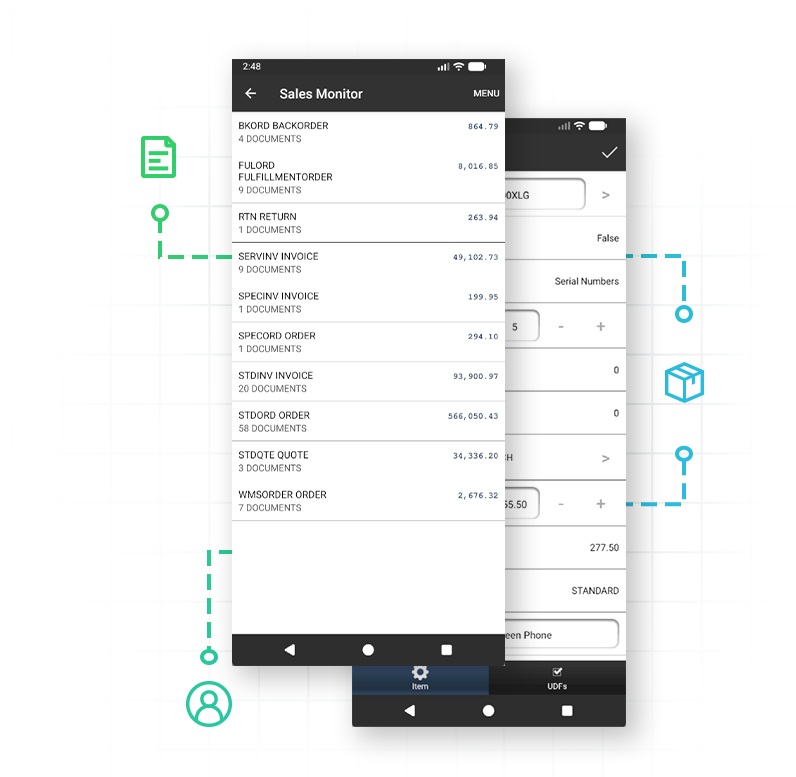
Search, view, and create quotes, orders, invoices, and returns directly from iOS and Android devices.
Lightning-fast order entry
Add line items in seconds using the digital catalog, a customizable Quick Pick menu, recent items lists, or bulk item entry.
Integrated barcode scanning
Use external Bluetooth scanners (Honeywell, Socket Mobile, Infinite Peripherals) to scan item barcodes directly onto an order.
Live inventory & tiered pricing
View multi-warehouse stock levels, pricing, and quantity breaks in real time before making a commitment.
SalesPad workflow integration
When paired with SalesPad, completed documents immediately hit your back-office workflow queues for automated routing. (Standalone GP users can still create and manage standard GP orders directly.)
Sales Monitor
Track documents across workflow queues to spot bottlenecks from anywhere, and advance orders to the next queue directly from your device.
The Challenge
On-the-go CRM & lead capture
Outside sales teams and trade show staff often collect business cards in person or scribble down notes on paper, leaving customer records out-of-date. When follow-ups fall through the cracks, potential deals slip away before they ever even reach your CRM.
How SalesPad Mobile Solves it
From first contact to final follow-up
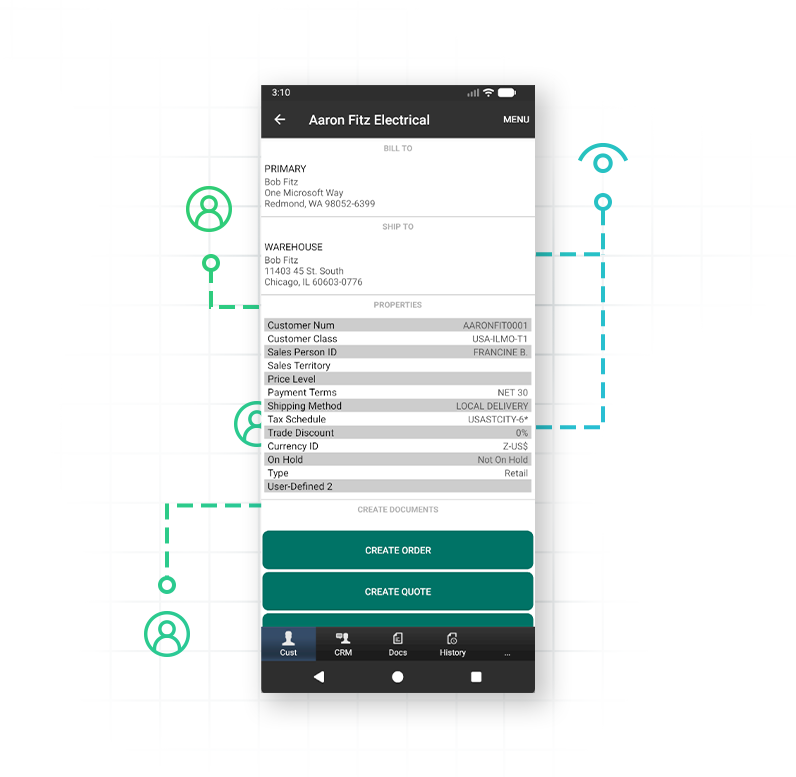
Customer & contact management
Search customer accounts, view billing and shipping addresses, and create or edit contacts on the fly.
Favorites list
Star top customers and contacts as Favorites for instant access without searching.
Prospects & opportunities
Capture lead details at trade show booths or customer sites, then convert them into active customers and quotes when you win the deal.
Task & interaction tracking
Log meeting notes, schedule follow-up tasks, and review past account interactions from anywhere.
The Challenge
Field payments & E-signatures
Collecting unlinked checks or credit card payments in the field creates hours of reconciliation work for your accounting team. Worse, taking customer signatures on paper forms leaves orders vulnerable to misplaced paperwork and disputed invoices, too.
How SalesPad Mobile Solves it
Close and collect on the spot
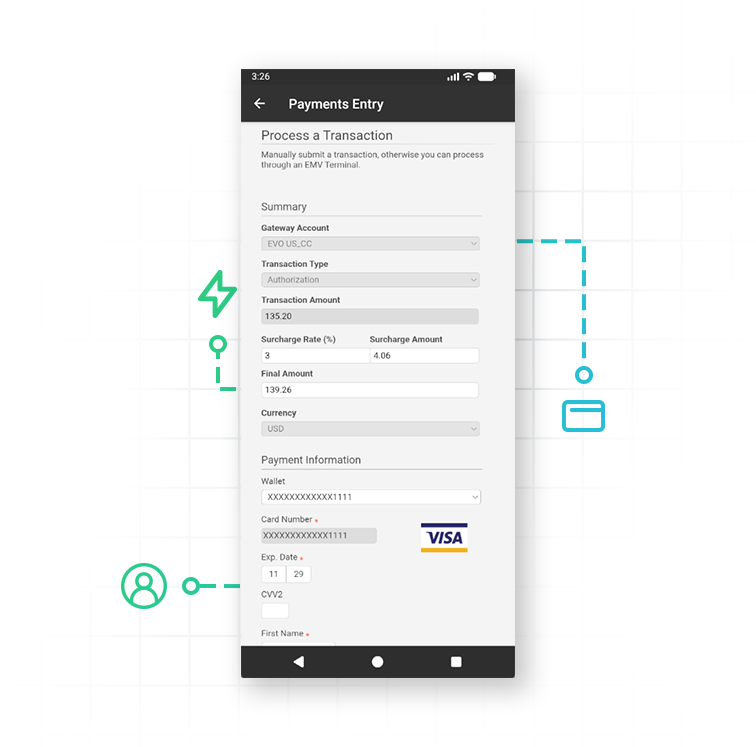
Integrated credit card processing
Process authorizations, charges, credits, and voids natively through PayFabric by Global Payments or Square integrations.
Card reader hardware support
Tap, dip, or swipe cards securely using the Pax A920 SmartMobile (PayFabric by Global Payments) or connected Square credit card readers.
Digital E-signatures
Capture sign-offs directly on the mobile screen to lock in orders before leaving the customer site.
Multi-signature support
Record separate signatures for distinct purposes, such as order authorization and receipt of goods, on the same document.
Instant document actions
Forward, print, or email finalized order confirmations and receipts directly to the customer on the spot.
The Challenge
Offline selling & tailored security
Cloud-dependent mobile tools fail when reps enter cellular dead zones or end up on rural customer sites. Meanwhile, one-size-fits-all mobile apps risk exposing sensitive financial data to users who don’t need it.
How SalesPad Mobile Solves it
Offline-ready, role-secure
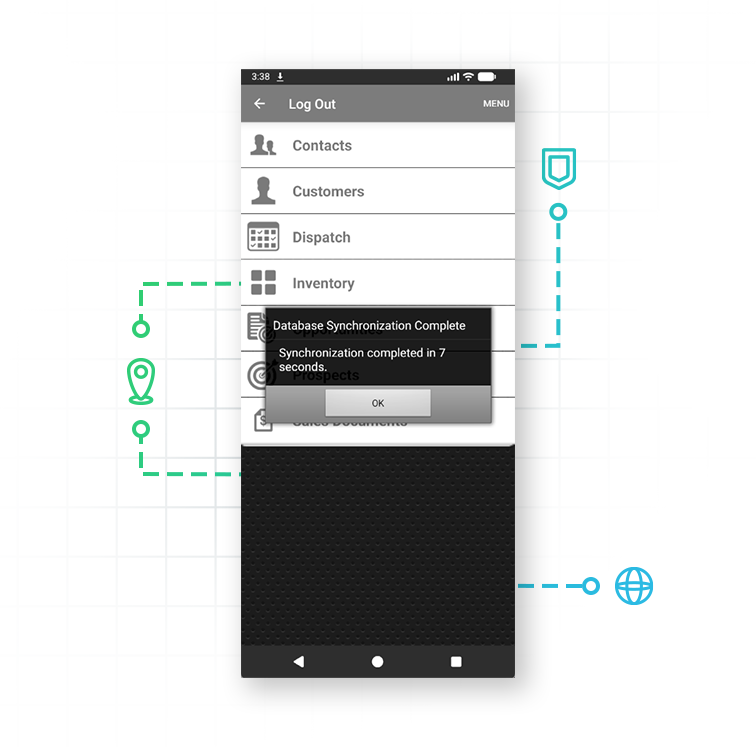
Uninterrupted offline mode
Sync essential CRM and catalog data locally so reps can continue quoting, building orders, and updating accounts without cell service.
Automatic server syncing
Push all offline orders and edits back to the main Dynamics GP server automatically once a data connection is re-established.
Tab manager
Tailor mobile screen view and edit access per user role without writing custom code.
Granular security controls
Restrict visible workflow queues, limit editable fields, and enforce user permissions through the backend server.
Unlimited user-defined fields (UDFs)
Expose custom fields for customers, items, and sales lines directly on mobile devices to match your operational reality (Note: UDFs require SalesPad, so if they’re a priority, consider SalesPad and SalesPad Mobile, together).
Custom scripting hooks
Run Pre-Save and Post-Save trigger scripts to validate custom business logic before transactions are committed.
Customer Success Story
PicnicTime
Over the course of 35 years, Picnic Time has grown from a small food store to a company that processes up to 150,000 orders a year, and ships worldwide. This growth meant the team needed a reliable, flexible system that could be customized to how the business works, that would meet high customer service standards, and that would streamline order processing while minimizing clicks. Enter SalesPad, plus SalesPad Mobile for on-the-go efficiency.
“I use SalesPad on a daily basis to keep a pulse on the overall health of the company. When it comes to inventory, customer, and sales data, having it all at our fingertips [especially with SalesPad Mobile] is priceless. It saves me time, it saves our customer service reps time, and it really guides us in the right direction.”
Paul Cosaro, Managing Partner and “Captain Picnic” at Picnic Time

Unwavering support for our SalesPad customers.
You’re in control of your timeline.
The Salespad suite
Built to Master Every Distribution Challenge
When standard ERP functionality isn’t enough, SalesPad steps in. Our suite of specialized products is designed to solve the most difficult challenges in distribution—from the field and the warehouse to the shipping dock and beyond.
Standalone Products
Core software sold in a bundle or separately.
Add-ons
Specialized tools that sit on top of SalesPad products.
SalesPad
Drive operational efficiency for sales, purchasing, inventory management, and beyond.
SalesPad Mobile
Empower field reps to enter orders and check inventory on the go.
Inventory Manager
Mobile-first warehouse management for picking, packing, receiving, and more.
ShipCenter
Native shipping platform with carrier integrations and real-time rate shopping.
ShipTo
Connect SalesPad to UPS WorldShip and FedEx Ship Manager.
Web API
Seamlessly connect SalesPad to your external web stores and third-party apps.
Customer Portal
24/7 self-service B2B web application for order creation, inventory visibility, and invoice payments.
Automation Agent
The background engine that automates document transfers, reporting emails, and customer AR communication.
Customer IQ
Identify high-value accounts and detect early churn signs with AI-driven insights. This intelligence triggers automated workflows to prioritize at-risk outreach and protect your most profitable relationships.
Configurator
Build complex made-to-order items with guided attribute selection.
Manufacturing
Specialized tools for work order management and production tracking.
RMA
Unified customer history and streamlined returns management.
Returns Tracker
Deep visibility into return root causes to protect your margins.
Dispatch
Manage your internal fleet with digital routing and delivery confirmation.
Standalone Products
Core software sold in a bundle or separately.
SalesPad
Drive operational efficiency for sales, purchasing, inventory management, and beyond.
SalesPad Mobile
Empower field reps to enter orders and check inventory on the go.
Inventory Manager
Mobile-first warehouse management for picking, packing, receiving, and more.
ShipCenter
Native shipping platform with carrier integrations and real-time rate shopping.
ShipTo
Connect SalesPad to UPS WorldShip and FedEx Ship Manager.
Web API
Seamlessly connect SalesPad to your external web stores and third-party apps.
Customer Portal
24/7 self-service B2B web application for order creation, inventory visibility, and invoice payments.
Add-ons
Specialized tools that sit on top of SalesPad products.
Automation Agent
The background engine that automates document transfers, reporting emails, and customer AR communication.
Customer IQ
Identify high-value accounts and detect early churn signs with AI-driven insights. This intelligence triggers automated workflows to prioritize at-risk outreach and protect your most profitable relationships.
Configurator
Build complex made-to-order items with guided attribute selection.
Manufacturing
Specialized tools for work order management and production tracking.
RMA
Unified customer history and streamlined returns management.
Returns Tracker
Deep visibility into return root causes to protect your margins.
Dispatch
Manage your internal fleet with digital routing and delivery confirmation.
FAQ
Does SalesPad Mobile require SalesPad?
Not necessarily, if your team only needs core mobile order entry for Dynamics GP (but you may want to consider them together). SalesPad Mobile can run as a standalone product connected directly to Microsoft Dynamics GP. However, when paired with SalesPad, your mobile orders can leverage full SalesPad workflows to automatically route documents through approval and fulfillment queues, trigger customer email notifications, and enforce advanced business rules. (Note: If used standalone without SalesPad, the mobile app cannot leverage SalesPad workflows).
Which devices and operating systems are supported by SalesPad Mobile?
SalesPad Mobile is available as a dedicated application for both iOS and Android devices. The app requires a minimum of iOS 17.0 for Apple devices and Android 7.1 for Android devices (note that Square Reader functionality requires Android 9.0 or higher).
Can my team continue selling with SalesPad Mobile if they lose cell service?
Yes, SalesPad Mobile features a dedicated offline mode. Field reps can sync critical CRM and item data to a local database on their device to continue creating sales documents, updating customers, and managing their accounts offline. Once an internet connection is re-established, they can push all those changes back to the main server.
Are we able to process credit card payments in the field with SalesPad Mobile?
Yes, SalesPad Mobile integrates directly with PayFabric by Global Payments and Square, so field reps and trade show staff can use PayFabric Pax A920 SmartMobile devices and Square credit card readers to process authorizations, charges, credits, and voids: all securely from the app.
How does SalesPad Mobile handle barcode scanning and printing?
For fast order entry, reps can scan barcodes using third-party accessories, including Honeywell barcode readers, Socket Mobile cordless scanners, and Infinite Peripherals scanners. For printing, the app supports Zebra portable printers, WiFi-connected printers, and AirPrint-compatible printers on iOS, so reps can print receipts and confirmations on the spot.
Does SalesPad Mobile show real-time inventory availability?
Yes. When online, the mobile app connects directly to your back-office server, meaning all inventory, pricing, and sales data is updated in real time. Reps can view exactly how much of an item is on hand, backordered, or allocated across different warehouses before they place an order.
Can customers sign for their orders or deliveries on SalesPad Mobile?
They can. Not only can reps and mobile staff capture e-signatures directly on the sales document, but the SalesPad Mobile app also supports signature reasons allowing you to capture multiple signatures on the same document for different purposes (e.g., one signature for order approval and a separate one for receipt of goods).
Can customers sign for their orders or deliveries on SalesPad Mobile?
They can. Not only can reps and mobile staff capture e-signatures directly on the sales document, but the SalesPad Mobile app also supports signature reasons allowing you to capture multiple signatures on the same document for different purposes (e.g., one signature for order approval and a separate one for receipt of goods).
How is SalesPad Mobile licensed?
SalesPad Mobile uses a concurrent user licensing model, which means you are licensed based on the number of users logged into the mobile app at the same time. Administrators have full visibility into these connections, and they can manage them via the Mobile License Manager.