
Inventory Manager for dynamics gp
Real-Time Warehouse Accuracy for Distributors on Dynamics GP
When inventory moves, your system should move with it. Inventory Manager lets warehouse teams receive, move, pick, pack, and count inventory in real time: from anywhere, on either mobile or desktop. (Plus, every update flows directly into Dynamics GP, so you can use Inventory Manager as a standalone solution, or paired with SalesPad.)
Customer success story | PicnicTime
“More than a front end for GP,” Inventory Manager offers a better way to run your operations.
PicnicTime processes up to 150,000 orders a year, and as the business grew, it needed faster order processing and a warehouse management system it could trust. The clear answer was SalesPad, plus Inventory Manager, for the flexible workflows and real-time inventory tools the team needed to keep orders moving smoothly and quickly.
Why inventory manager for GP?
Your warehouse moves fast. Your inventory records don’t keep pace, but they could.
Dynamics GP keeps the official inventory record, but inventory changes all day long as product moves off shelves and makes its way to buyers. When those changes live on paper until (or if) someone enters them later, the whole team is stuck working from an inaccurate system with out–of-date data. And when this happens all the time, warehouse managers spend more of their time tracing mistakes and mispicks than getting orders out.
Inventory Manager gives distributors the boost of confidence they need to know what’s available, in real time, all the time. At the point of transaction, a simple scan confirms the status change and updates GP immediately, so your team also gets to benefit from less paper, fewer errors, and a shorter path from purchase to delivery. That looks like:
Picking and packing orders right (the first time)
Every wrong shipment costs you much more than a re-shipment. It creates a return, a credit, and extra warehouse work (not to mention an unhappy, waiting customer).
Inventory Manager ensures the right product is being pulled before it leaves the warehouse, and can validate the bin, item, quantity, lot, or serial number based on the rules your business needs.
Ending slow manual receiving for good
A receiving mistake creates issues everywhere else, and often leaves purchasing, sales, and customer service working from bad information.
Inventory Manager lets receivers scan products against open purchase orders, so they can confirm what arrived, capture lot or serial information, generate labels, and move a product into the right location: all from their mobile device while actively on the job.
Knowing where your inventory is at all times
Inventory is only useful when your team can find it. Inventory Manager records bin transfers, site transfers, in-transit transfers, replenishment, and adjustments as they happen.
That means warehouse teams get a clearer view of where product is stored, service teams can give customers faster answers, and managers spend less time figuring out why the system and the shelf don’t match.
For better, faster, warehouse ops
The Mobile (and Desktop) Tool Designed to Move Inventory Reliably
For distributors, every day, paper pick tickets lead to “grabbed-the-wrong-item” errors. The reality of the job, though outdated, looks like writing down received quantities and serial numbers to be typed into GP later. Because real-time scanning isn’t something most teams can rely on, they’re forced to rely on likely-to-be-incorrect stock levels all the time. That’s still how most GP warehouses run, and it’s expensive in ways that are easy to miss, until the returns start piling up. Inventory Manager replaces the paperwork with barcode scanning, so what’s in GP matches what’s on the shelf, all the time. Because distribution deserves better, and customers are demanding more. With Inventory Manager for GP, you can guarantee warehouse accuracy and efficiency on every transaction.
The Challenge
Order fulfillment (pick & pack)
Paper-based picking doesn’t help pickers move faster. There’s no batching multiple orders together, no routing to the right bin first, and nothing stopping someone from over-picking an order until it’s already too late.
How Inventory manager Solves it
Faster picks. Fewer errors.
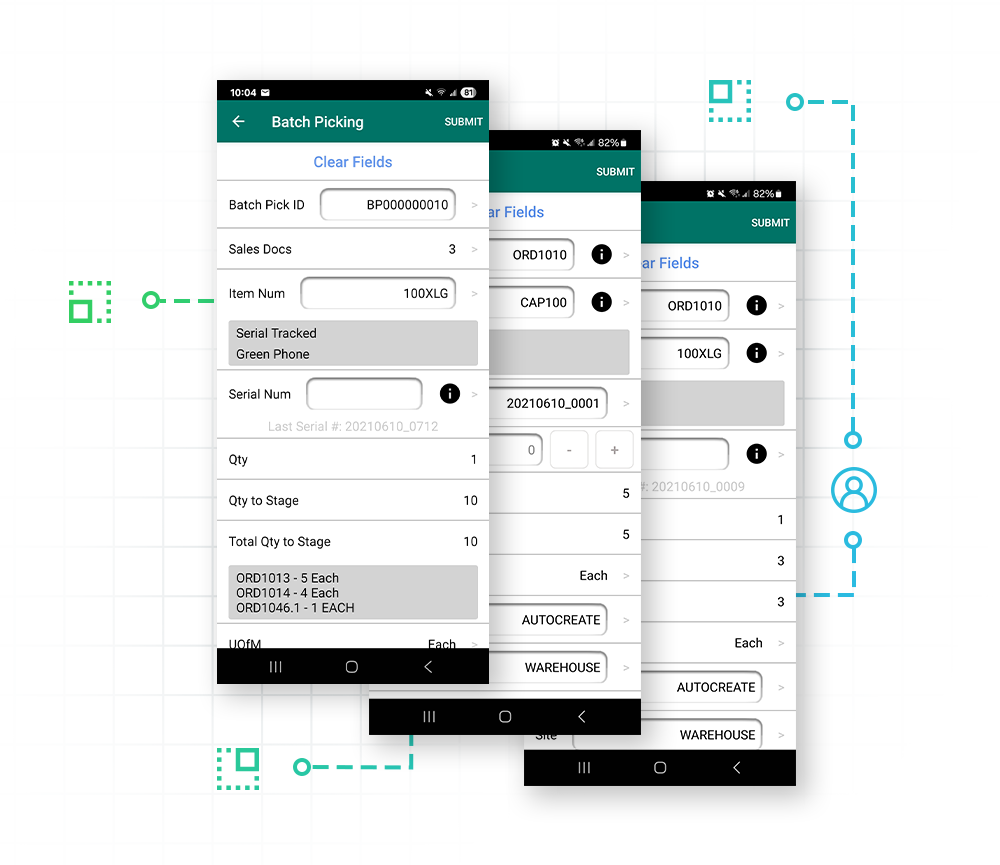
Standard picking
Pull up open sales documents, view the exact items needed, and scan barcodes to validate the pick. (The system won’t let a user over-pick an order unless you specifically allow it).
Batch picking
Group multiple sales documents into a single batch pick, so pickers grab everything needed for several orders in one pass through the warehouse.
Directed picking
Configure priorities so the mobile app automatically suggests the best bin, lot, or serial number to pick next, including FEFO for lots and FEFO for serial items.
Mobile packing
Use package templates to auto-populate box dimensions, hook up a USB scale for instant weight capture, and record exactly what’s in every box.
The Challenge
Receiving & putaway
Standard receiving leaves much to guesswork: what to verify, how to assign a lot or serial number, and where the product belongs once it’s inside the warehouse.

How Inventory Manager Solves it
Go faster from dock to stock
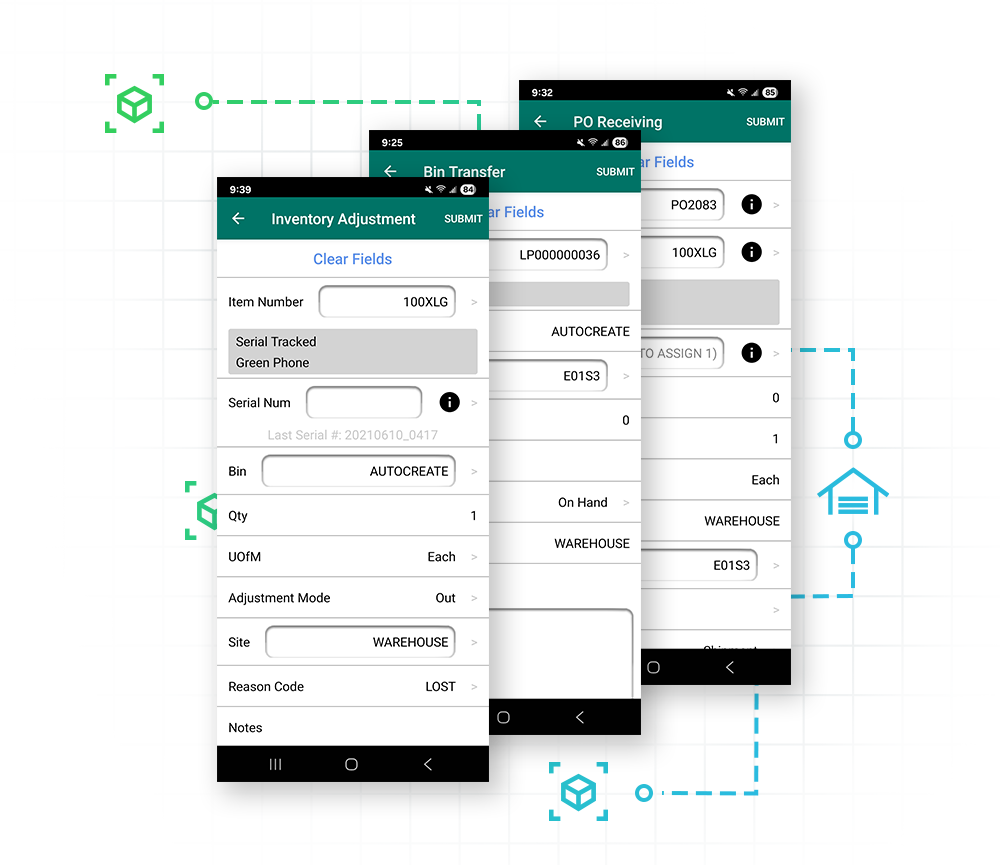
PO receiving
Scan items directly off the delivery truck to receive them against open purchase orders.
Auto-generate serials/lots
Can be configured to automatically generate and assign custom-formatted serial or lot numbers the moment an item is received.
Receipt confirmation
Add an optional secondary verification step to double-check received items against the paperwork before inventory is finalized.
Putaway reports
Receive everything to a primary dock bin, then generate a putaway report to guide workers on exactly where stock belongs.
The Challenge
Inventory management & movement
Moving inventory, whether it’s a bin transfer, a pallet headed to another site, or a quick adjustment, is easy to do. It’s also easy to lose track if it’s not being recorded as it happens.
How Inventory Manager Solves it
Keep inventory moving
Bin & site transfers
Move inventory from one bin to another, or one warehouse site to another, with a few quick scans.
In-transit transfers (ITT)
Pick items from the source site, move them to a “via” or mid-way site, and receive them once the truck arrives at the destination.
License plating
Group multiple items onto a pallet under one license plate barcode, then move, transfer, or pick the whole pallet with one scan.
Inventory adjustments
Easily adjust quantities in or out to account for breakages, lost items, or found stock.
Bin replenishment
Set minimum/maximum thresholds so the system automatically suggests moving stock from bulk back-bins to active pick-bins.

The Challenge
Auditing & stock counts
Intermittent stock counts leave inventory numbers stale between audits. When a discrepancy does turn up, as is inevitable, there’s no record of who touched what or when.
How Inventory Manager Solves it
Know what’s actually in stock
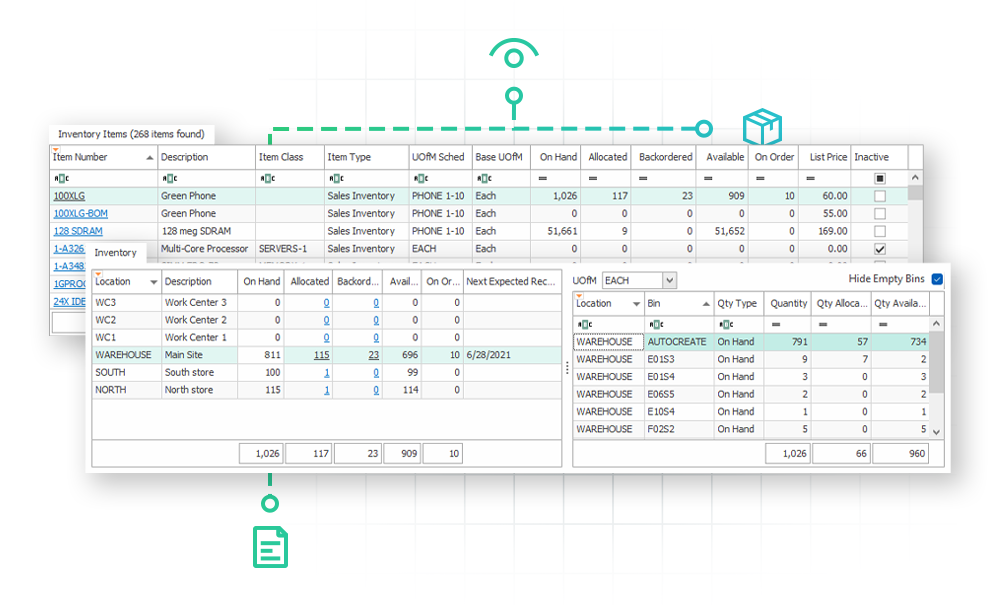
Mobile stock counts
Schedule a count in the desktop app and execute it on a mobile device. That means workers can scan bins and items to capture actual physical counts and variances instantly.
Override quantities
For non-tracked items, allow the counted quantity to overwrite the available bin quantity.
Transaction logging
Every mobile submit is logged in transaction audit tables , giving managers full transaction visibility.
The Challenge
Light manufacturing & assembly
For distributors who also assemble or kit products, tracking component issues and scrap by hand adds yet another manual step to a paper-heavy process.
How Inventory Manager Solves it
Simplify every assembly
Assembly entry
Edit distribution BOM assemblies directly from the mobile scanner.
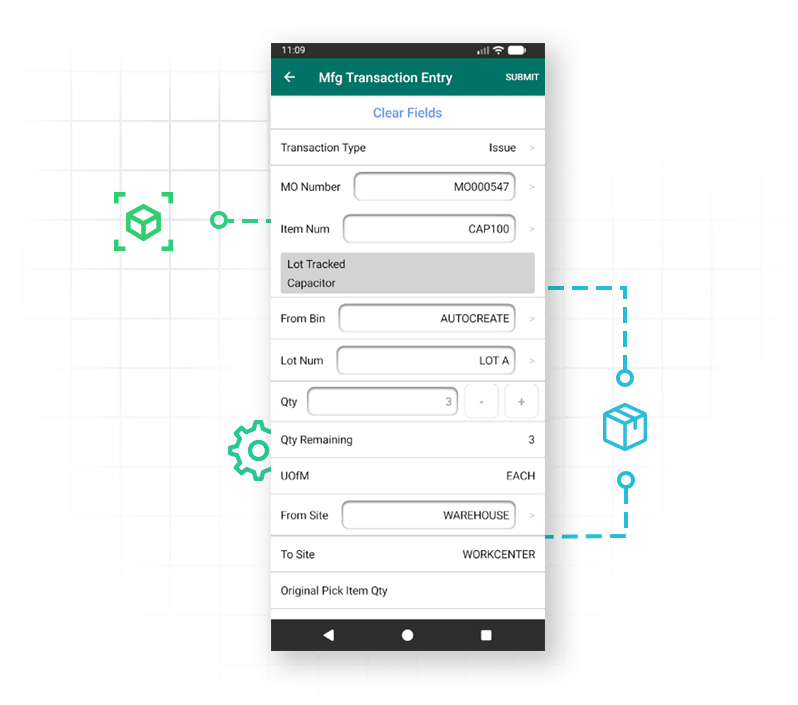
Manufacturing transaction entry
Scan to issue components to open manufacturing orders, reverse issues, and process (or reverse) scrap transactions.
The Challenge
Advanced hardware & configuration
Warehouse hardware and workflows look different for every distributor, but standard warehouse software often ships with fixed screens and fields that can’t flex and shift to match a team’s process or equipment.
How Inventory Manager Solves it
Use the devices you trust
Broad device support
Native support for iOS and Android, plus deep integrations with Zebra, Honeywell, Socket Mobile, and Lexicon hardware.
Mobile layout manager
Tailor mobile screens for each user group without custom code: rearrange fields, make inputs read-only, or force a scan instead of manual typing.
Smart barcode parsing
Use Scan Parse Scripts to read advanced barcodes like GS1, automatically pulling the item number, unit of measure, lot number, and expiration date from a single barcode scan.
Mobile label printing
Trigger Smart Printing rules to auto-print item, bin, or receipt labels as soon as a transaction is submitted.
Customer Success Story
PicnicTime
Over the course of 35 years, Picnic Time has grown from a small food store to a company that processes up to 150,000 orders a year, and ships worldwide. This growth meant the team needed a reliable, flexible system that could be customized to how the business works, that would meet high customer service standards, and that would streamline order processing while minimizing clicks. Enter SalesPad, plus Inventory Manager.
“I use SalesPad on a daily basis to keep a pulse on the overall health of the company. When it comes to inventory, customer, and sales data, having it all at our fingertips is priceless. It saves me time, it saves our customer service reps time, and it really guides us in the right direction.”
Paul Cosaro, managing partner and “Captain Picnic” at Picnic Time

Unwavering support for our SalesPad customers.
You’re in control of your timeline.
The Salespad suite
Built to Master Every Distribution Challenge
When standard ERP functionality isn’t enough, SalesPad steps in. Our suite of specialized products is designed to solve the most difficult challenges in distribution—from the field and the warehouse to the shipping dock and beyond.
Standalone Products
Core software sold in a bundle or separately.
Add-ons
Specialized tools that sit on top of SalesPad products.
SalesPad
Drive operational efficiency for sales, purchasing, inventory management, and beyond.
SalesPad Mobile
Empower field reps to enter orders and check inventory on the go.
Inventory Manager
Mobile-first warehouse management for picking, packing, receiving, and more.
ShipCenter
Native shipping platform with carrier integrations and real-time rate shopping.
ShipTo
Connect SalesPad to UPS WorldShip and FedEx Ship Manager.
Web API
Seamlessly connect SalesPad to your external web stores and third-party apps.
Customer Portal
24/7 self-service B2B web application for order creation, inventory visibility, and invoice payments.
Automation Agent
The background engine that automates document transfers, reporting emails, and customer AR communication.
Customer IQ
Identify high-value accounts and detect early churn signs with AI-driven insights. This intelligence triggers automated workflows to prioritize at-risk outreach and protect your most profitable relationships.
Configurator
Build complex made-to-order items with guided attribute selection.
Manufacturing
Specialized tools for work order management and production tracking.
RMA
Unified customer history and streamlined returns management.
Returns Tracker
Deep visibility into return root causes to protect your margins.
Dispatch
Manage your internal fleet with digital routing and delivery confirmation.
Standalone Products
Core software sold in a bundle or separately.
SalesPad
Drive operational efficiency for sales, purchasing, inventory management, and beyond.
SalesPad Mobile
Empower field reps to enter orders and check inventory on the go.
Inventory Manager
Mobile-first warehouse management for picking, packing, receiving, and more.
ShipCenter
Native shipping platform with carrier integrations and real-time rate shopping.
ShipTo
Connect SalesPad to UPS WorldShip and FedEx Ship Manager.
Web API
Seamlessly connect SalesPad to your external web stores and third-party apps.
Customer Portal
24/7 self-service B2B web application for order creation, inventory visibility, and invoice payments.
Add-ons
Specialized tools that sit on top of SalesPad products.
Automation Agent
The background engine that automates document transfers, reporting emails, and customer AR communication.
Customer IQ
Identify high-value accounts and detect early churn signs with AI-driven insights. This intelligence triggers automated workflows to prioritize at-risk outreach and protect your most profitable relationships.
Configurator
Build complex made-to-order items with guided attribute selection.
Manufacturing
Specialized tools for work order management and production tracking.
RMA
Unified customer history and streamlined returns management.
Returns Tracker
Deep visibility into return root causes to protect your margins.
Dispatch
Manage your internal fleet with digital routing and delivery confirmation.
FAQ
Does Inventory Manager require SalesPad?
Not necessarily, if your team doesn’t need SalesPad as well (but you may want to consider them together). Inventory Manager can run as a standalone product connected directly to Dynamics GP. When paired with SalesPad, it can use workflows to orchestrate your fulfillment steps for picking, packing, and shipping, fulfillment completion can trigger automatic customer email notifications and invoicing in SalesPad, and custom data can be entered and referenced via user-defined fields.
What can warehouse workers do in Inventory Manager?
With Inventory Manager, workers can pick, pack, return, receive, put away, transfer, replenish, adjust, count, and look up inventory from a mobile device. It also supports lot and serial tracking, license plating, and light assembly workflows. (Explore the documentation to dive into how it works on both mobile and desktop.)
Does Inventory Manager support multiple bins and warehouses?
Yes. Teams can work across multiple bins and warehouse sites, and Inventory Manager supports various transfer methods to move inventory between those locations.
Can Inventory Manager support lot- and serial-tracked products?
Yes. Users can scan and validate serial and lot numbers during receiving, picking, transfers, and inventory lookups. Inventory Manager also supports serial/lot generation and related fields, like expiration dates.
What kinds of barcode scanners does Inventory Manager support?
Inventory Manager supports a range of barcode-scanning hardware for both iOS and Android warehouse workflows, including (but not limited to) compatible Zebra, Honeywell, Socket Mobile, and Koamtac devices. Because compatibility can vary by device and operating system, review Cavallo’s current list of recommended scanner models and hardware requirements before purchasing or deploying on devices.
Is Inventory Manager the same as DataCollection?
Yes. DataCollection is the former product name. The current product name is Inventory Manager. Functionality is the same.