
Customer IQ for SalesPad For GP
See what every customer relationship needs next, then act accordingly
Your customer data can tell you a lot: which accounts drive profit, which buying patterns are changing, and where a timely conversation could make a difference. The challenge is getting that information in front of the right people before a pricing decision is made without the full picture — or worse, before an important account goes quiet.
Customer IQ for SalesPad for GP, powered by the Profit Max Platform, brings customer health and profitability insights into SalesPad. It gives every account a profitability grade and a churn risk score, then makes that information available on the customer card, sales entry, search screens, reports, and dashboards your team already uses (no separate app required).
Why Customer IQ For Dynamics GP?
Your team has the right data. They just need a better way to use it.
Every customer relationship impacts your business, but they do not all look the same. Some accounts generate a large share of your profit. Some may be ordering less often than they used to, while others may require more time and effort than their margin contribution can justify. That context is already in your Dynamics GP and SalesPad data. The hard part is finding it quickly enough to use it in a customer conversation, a pricing decision, or an order workflow.
Customer IQ turns that transaction history into clear customer health insights your team can use, in the SalesPad screens they already know. That gives your team a way to:
Understand the value and health of every account
Customer IQ gives each account an ABCD grade based on its financial contribution over the timeframe you choose. It can use profit dollars or sales dollars, depending on how your business evaluates customer value.
That gives sales, customer service, operations, and leadership a shared view of the account beyond order volume alone. Your team can better understand where to provide added attention, where to review service or pricing decisions, and where a customer relationship may require a tailored approach.
See changes in buying behavior early
Customers rarely announce when their needs are changing. In fact, it almost never happens. Still, they may begin ordering less often, reduce their average order size, and gradually move spending elsewhere.
Customer IQ looks at recency, frequency, and monetary activity to identify deviation from a customer’s normal buying pattern. It translates that analysis into five clear churn risk bands, from minimal to high, so your team can spot accounts that need attention before they become inactive.
Give teams insights they can use right away
Customer IQ puts ABCD grades, churn risk scores, lifetime sales, and margin information directly on the customer card, sales screens, reports, and dashboards in SalesPad.
That means a rep can see account context during a customer conversation. A manager gets a birds-eye view of customer health across the business, with drill-down capabilities to identify issues and guide follow ups. And your operation can use Customer IQ fields in workflow when a customer’s value or risk level should affect how a document is handled or prioritized. Because those fields are available on SalesPad records, connected systems can sync and use the same customer context for broader visibility.
For customer decisions that need more context
Give every customer conversation better context (and in turn, better service)
Your team already knows its customers and works hard to take care of them. Customer IQ gives them a clearer view of the full relationship when they need it: how the customer buys, what they contribute to the business, and whether their buying pattern is changing.
That context is built into SalesPad, not buried somewhere in a separate report or platform. Customer service, sales, or operations teams, and managers, can see it while reviewing a customer, entering an order, responding to a request, or deciding what should happen next. Plus these fields can be leveraged for workflows, directed picking prioritization, integrated system data, and proactive outreach.
The Challenge
See the full relationship behind the order
A customer’s current order is only part of the picture. A request for special pricing, expedited service, or an exception may make sense for one relationship and require a different approach for another.
Without easy access to account history and profitability context, a rep needs to stop what they are doing, search through reports, and ask someone else for help before giving the customer an informed answer.
How Customer IQ helps
See customer value instantly
Customer IQ gives every account an ABCD grade based on its financial contribution over a timeframe you choose. By default, the grade is based on profit dollars, but it can also be based on sales dollars. It also makes Lifetime Sales, Lifetime Margin, and Lifetime Margin Percentage available directly on SalesPad’s customer card. Your team can see the broader account context while on the phone with the customer, not after the conversation is over.
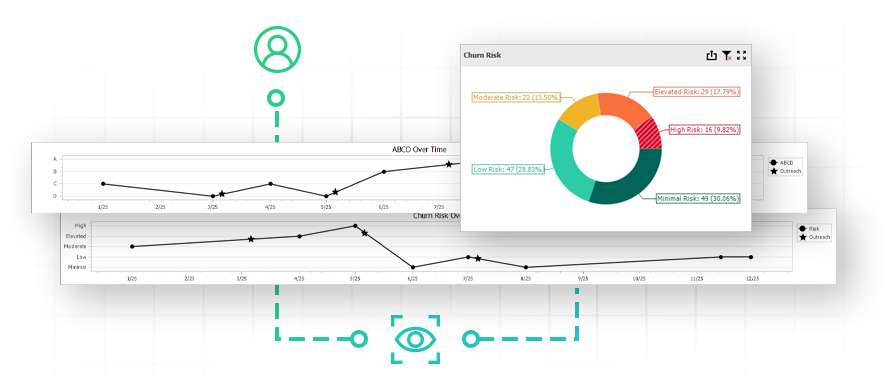
The customer card’s new Customer IQ tab shows how an account’s profitability and risk have changed over time, surfacing buying changes and concerns in the same hub where sales reps spend their day-to-day.

The Challenge
Notice buying changes before they become bigger problems
Customer relationships can change gradually. An account may begin ordering less often, wait longer between purchases, or reduce its typical order size. Those changes are easy to miss when a team is managing a large customer base and focusing on the work in front of them. By the time an account has been inactive long enough to stand out, the customer may already be buying elsewhere.
How customer iq helps
Turn risk into retention
Customer IQ looks at recency, frequency, and monetary activity for each account’s ordering history to identify changes in their normal buying behavior. It considers how long it has been since the customer’s last order, how that timing compares with their usual purchase interval, and whether their spend is changing. It then translates the result into five risk bands: minimal, low, moderate, elevated, and high.
For example, if a customer normally orders every two weeks but has not ordered in more than a month, Customer IQ flags that shift in their risk level. This gives the team a reason to check in earlier and better understand what the customer may need.
The Challenge
Give your team a structured process for proactive outreach
When teams manage many accounts, it can be difficult to decide where to focus first. Even when a customer’s buying behavior changes, a follow-up can get lost between orders, quotes, service requests, and the rest of the day’s priorities. That does not mean the team is not paying attention, but it does mean there are important signals that need a clear path to action.
How customer iq helps
Never miss a follow-up
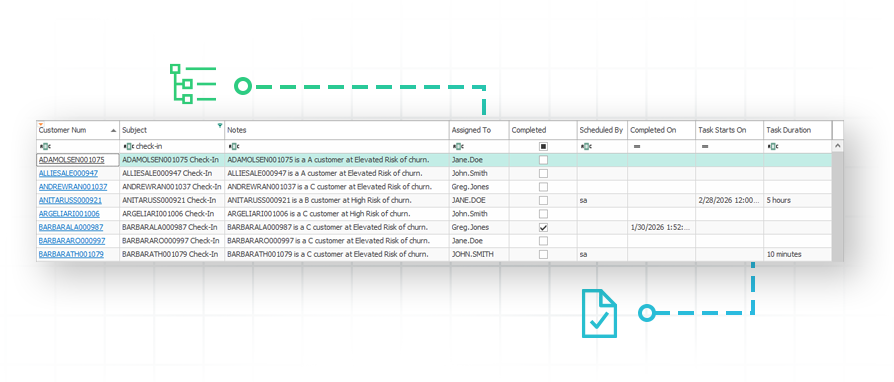
Customer IQ includes new customer outreach tools that integrate with the SalesPad Today calendar, generating outreach suggestions based on your rules so those tasks can be scheduled and actioned on. You can set who receives the task and include useful account context in the description, such as the customer name, ABCD score, and churn risk score. This gives reps a clearer starting point for a customer conversation and gives managers visibility into outreach activity across their teams.
Reps then schedule those outreach tasks on their calendar or just complete them directly, or they can reassign them if they need to share the load or cover vacations. Managers can review open, completed, reassigned, and cancelled tasks in a new management screen, and hold people accountable when assigned outreach isn’t prioritized. Completed outreach is highlighted in the customer card’s Customer IQ tab timelines, surfacing how these efforts actually impact each account’s profitability and risk.
The Challenge
Use relevant customer context in your workflow
Customer information is most useful when it can support the way your operation works. If account value, margin, and churn risk only live in a report, your team still has to remember to look for it before making a decision. That’s not realistic when orders are moving quickly through automated workflows, and you shouldn’t have to slow down your operations by adding in manual checks.
How customer iq helps
Priority order routing
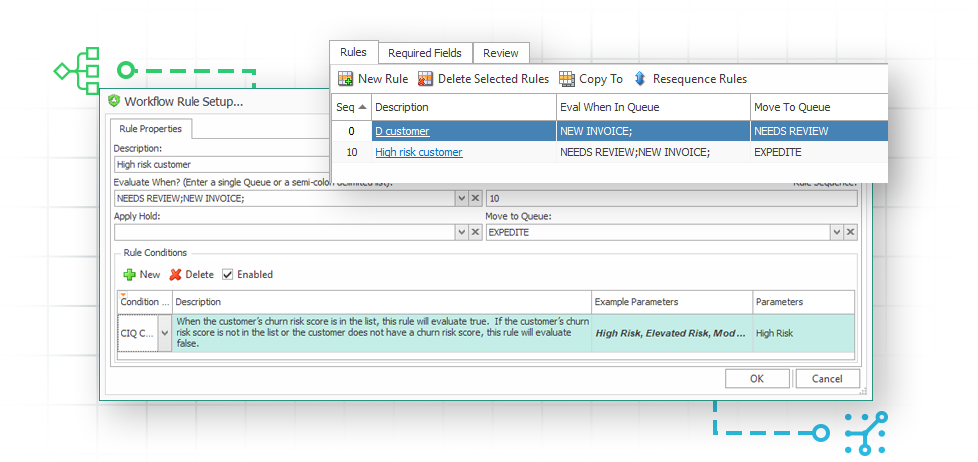
Customer IQ adds workflow rules based on ABCD score, churn risk, lifetime sales, lifetime margin, and lifetime margin percentage.
You can apply those automated checks to workflows for sales documents and customers in SalesPad. For example, you may choose to route a high-value customer’s order through a priority workflow path, flag an account whose churn risk has increased, or route an order for manager review when the customer’s account history calls for a closer look. In short: you decide how your workflow should work, and Customer IQ gives your team the context to fine-tune your processes to better support your customer relationships.
The Challenge
Help your teams make better decisions across your ERP ecosystems
Customer health and profitability data is less useful when it stays inside one system. Sales, customer service, marketing, operations, and leadership may work in different applications, which can leave each team with a different view of the customer relationship. Without access to the same account context, it is harder to coordinate outreach, prioritize service, protect high-value accounts, or respond early when buying behavior changes.
How customer iq helps
Make better decisions automatically
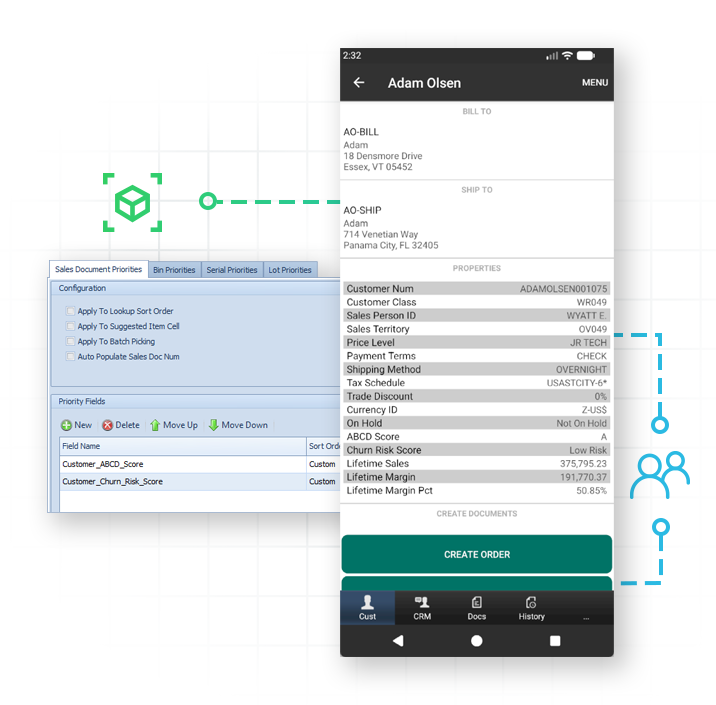
Customer IQ adds its new customer health fields directly to each sales document and customer, enabling data syncing for any system that connects to the GP database. This makes those insights available beyond SalesPad, including in SalesPad Mobile and HubSpot, where Customer IQ fields can sync to custom HubSpot fields for greater visibility in CRM outreach and account management. Inventory Manager can use customer health data for directed-picking prioritization, while SalesPad’s eCommerce, EDI, and other integrations can also leverage these fields based on their configuration.
Customer Success Story
Why SalesPad? Because the right visibility transforms what your team can do
“SalesPad really is a game-changer in that it gives us a much better user interface and access to our data. The data was always there before we had SalesPad, but now we can really interact with the data much more directly, and more efficiently.”

Unwavering support for our SalesPad customers.
You’re in control of your timeline.
The Salespad suite
Built to Master Every Distribution Challenge
When standard ERP functionality isn’t enough, SalesPad steps in. Our suite of specialized products is designed to solve the most difficult challenges in distribution—from the field and the warehouse to the shipping dock and beyond.
Standalone Products
Core software sold in a bundle or separately.
Add-ons
Specialized tools that sit on top of SalesPad products.
SalesPad
Drive operational efficiency for sales, purchasing, inventory management, and beyond.
SalesPad Mobile
Empower field reps to enter orders and check inventory on the go.
Inventory Manager
Mobile-first warehouse management for picking, packing, receiving, and more.
ShipCenter
Native shipping platform with carrier integrations and real-time rate shopping.
ShipTo
Connect SalesPad to UPS WorldShip and FedEx Ship Manager.
Web API
Seamlessly connect SalesPad to your external web stores and third-party apps.
Customer Portal
24/7 self-service B2B web application for order creation, inventory visibility, and invoice payments.
Automation Agent
The background engine that automates document transfers, reporting emails, and customer AR communication.
Customer IQ
Identify high-value accounts and detect early churn signs with AI-driven insights. This intelligence triggers automated workflows to prioritize at-risk outreach and protect your most profitable relationships.
Configurator
Build complex made-to-order items with guided attribute selection.
Manufacturing
Specialized tools for work order management and production tracking.
RMA
Unified customer history and streamlined returns management.
Returns Tracker
Deep visibility into return root causes to protect your margins.
Dispatch
Manage your internal fleet with digital routing and delivery confirmation.
FAQ
What is Customer IQ?
Customer IQ is the customer health and profitability tool for SalesPad for Dynamics GP. It uses your customer sales history to give every account an ABCD grade and churn risk score, then displays that context throughout SalesPad. That means your team can see the information on customer cards, sales entry, search screens, reports, and dashboards without logging into a separate analytics platform.
What does the ABCD grade mean?
Customer IQ assigns each customer an A, B, C, or D grade based on their financial contribution over a timeframe you choose. By default, the grading is based on profit dollars, but it can also be based on sales dollars.
‘A’ customers represent the top 75% of the selected business dollars. ‘B’ customers represent the next 15%, ‘C’ customers represent the remaining customers with positive margin, and ‘D’ customers are accounts that are costing the business money. This grade gives your team a simple way to understand the account context behind an order or customer conversation.
Learn more
How does Customer IQ identify churn risk?
Customer IQ looks at a customer’s recent activity and compares it with their normal buying behavior. It considers:
- How long it has been since the customer last ordered
- How that timing compares with their usual order frequency
- Whether their spending is holding steady or changing
The result is shown in five risk bands: minimal, low, moderate, elevated, and high.
Learn more
How often are Customer IQ scores updated?
Customer health metrics are calculated and refreshed daily through the Profit Max Platform. An Automation Agent job syncs that data into SalesPad, and this can be set to your preferred schedule.
Note that more resource-intensive variables, like the profitability ranking thresholds (the level at which a customer is ranked an ‘A’ vs a ‘B’, or a ‘B’ vs a ‘C’), are recalculated weekly by the Profit Max Platform.
Where can my team see Customer IQ data?
Customer IQ data is available throughout SalesPad. Users can see it on the customer card, the new Customer IQ tab, Customer Search, Customer Monitor, Sales Entry, Sales Monitor, Sales Document Search, Sales Batch Processing, and sales mass update screens. Customer IQ also includes a new visual dashboard and a pre-built quick report for company-side customer health visibility.
What customer information does Customer IQ show?
Customer IQ includes five core fields:
- ABCD Score
- Churn Risk Score
- Lifetime Sales
- Lifetime Margin
- Lifetime Margin Percentage
ABCD Score and Churn Risk Score are available on customers and their sales documents for visibility on cards and entry screens, filtering on search screens, and workflow automation. The lifetime fields are available only at the customer level.
Can Customer IQ help my sales teams manage follow-up?
Yes. Customer IQ includes new customer outreach tools that integrate with the SalesPad Today calendar, where users can schedule and complete suggested outreach tasks.
Scheduled jobs can create outreach suggestions based on the rules you define, targeting specific customers, assigning to sales reps or other SalesPad users, and surfacing helpful details for the conversation. Plus, managers can have visibility of outreach progress and history across their sales reps or territories to monitor activity and hold people accountable.
Can we use Customer IQ data in SalesPad workflows?
Yes. Customer IQ adds new workflow rules based on ABCD score, churn risk, lifetime sales, lifetime margin, and lifetime margin percentage.
You can use those conditions to route sales documents or customers based on the rules that fit your operation. For example, you might create a priority workflow path for certain customer segments, flag a customer whose churn risk has increased, or send an order for manager review when additional context is needed.
Can we control who sees customer health information?
Yes. Administrators can control access to Customer IQ fields by user group. That includes ABCD scores, churn risk scores, and lifetime sales and margin information. This allows you to make the information available to the people who need it while limiting access to sensitive customer profitability data.
Do we need to use the Profit Max Platform?
No. Customer IQ is powered by Profit Max Platform, which calculates customer health metrics in the background, but it is not required to buy the separate license for Profit Max Platform. Your team does not need to log into or directly use Profit Max Platform to work with Customer IQ in SalesPad. If you would like to leverage Profit Max Platform’s broader profitability insights, then you would need to purchase that additional license.
Does Customer IQ work with other SalesPad products?
Customer IQ is designed to work inside SalesPad for Dynamics GP. It can also extend to other separately licensed products and integrations. For example:
Automation Agent runs the daily customer health import and scheduled jobs to generate outreach suggestions. SalesPad Mobile displays Customer IQ fields on the mobile customer card. Inventory Manager can use customer health for directed picking prioritization. Other separately licensed SalesPad products and integrations can also leverage Customer IQ fields based on their configuration.
Each of these products and integrations has its own configuration and licensing requirements. Note that it is not required to buy Automation Agent; if you do not already have it then Automation Agent will be installed to support Customer IQ data syncing, but you will not have access to its other automation capabilities unless you buy that separate license.
Can Customer IQ data sync to HubSpot or other systems?
Yes. Customer IQ fields are available on SalesPad customer and sales-document records, allowing connected integrations to sync and use customer health context. SalesPad’s HubSpot integration, for example, can sync Customer IQ fields such as ABCD score and churn risk to custom HubSpot fields. Other integrations, including eCommerce and EDI connectors, can also leverage these fields based on their configuration and licensing.
What are the system and licensing requirements?
Customer IQ is a site-based license, and it requires SalesPad version 5.6.11 or later for base support. The daily sync requires the Automation Agent DLL to be installed, but it does not require a separate Automation Agent license.