
Supercharge Business Central Sales Order Management
Business Central is the backbone of your operations—a reliable system of record—but it wasn’t designed for complex order orchestration. SalesPad for BC adds the intelligence layer ERP systems lack.
Combining automated order workflows, real-time margin protection, and AI-driven churn prediction, it becomes the “brains” of your operations. Empower your team to go beyond simple transaction entry—start orchestrating a faster, more compliant, and more profitable sales journey today.
Acceleration of order processing through fewer manual touchpoints.
%
Faster approvals with automated conditional routing.
%
Improvement in revenue per employee.
“One business rule in SalesPad saves me seven figures a year.”

Kyle Forman
President, Krowne
Why Business Central Alone Isn’t Enough for Modern Distribution.
While While Business Central excels as a system of record, it isn’t a system of differentiation. As your order complexity grows, the gaps in standard ERP functionality become clear. Without a layer of strategic intelligence, your organization risks:
Manual processes
Pushing orders through the process one step at a time, waiting on someone to take manual action at every turn.
Catching mistakes too late
Discovering low margin or unprofitable orders only after they’ve been invoiced and shipped.
Chasing status
Digging through documents to figure out which orders need attention.
Losing customers silently
No warning when a valuable account starts slipping away.
Developer dependency
Relying on expensive custom code every time your business process needs to change.
the solution
SalesPad for BC
Your intelligent command center—SalesPad for BC transforms your sales order process into a guided, automated, and protected journey—allowing your team to leverage advanced orchestration, margin protection, and AI insights directly within their familiar Business Central environment.

Order Workflow Intelligence
Supercharge your sales order management with no-code workflows, process automation, and real-time visibility that streamlines fulfillment and enforces operational safeguards.

Real-Time Margin Protection
Protect your bottom line with real-time margin scanning that detects financial risk and flags low-margin or non-compliant orders before they are processed.

AI-Powered Customer Insights
Transform customer data into actionable strategy. Gain immediate visibility into an account’s financial contribution and use AI-powered behavioral analysis to identify customers at risk of leaving.
All within
MISSION CONTROL
PROFIT SCAN
CUSTOMER IQ
Mission control
Custom Order Workflow
Mission Control empowers business users to visually map, build, and enforce custom sales order workflows. Instantly deploy complex processes that match how your business actually works and keep orders moving—all without touching custom code or waiting for IT.
Your process, your rules, without IT.
Built-in guardrails
Set automated rules that block orders violating company policy—such as credit limit breaches or pricing floors—stopping downstream problems before they start.
Your data, your rules
Build workflows using standard Business Central data or the added flexibility of your own custom fields. Trigger actions and enforce rules based on the information that’s vital to how you run your business.
Smart routing
Automatically direct orders based on specific conditions. Flag low-margin orders for review, trigger white-glove handling for orders over $x, or route exceptions to managers for approval—all without changing your core process.
No-code custom workflows
Design step-by-step order processes that match how your business actually works. Select the conditions and actions that fit your operations—no code, no IT tickets—making order management simpler and more intuitive for everyone.
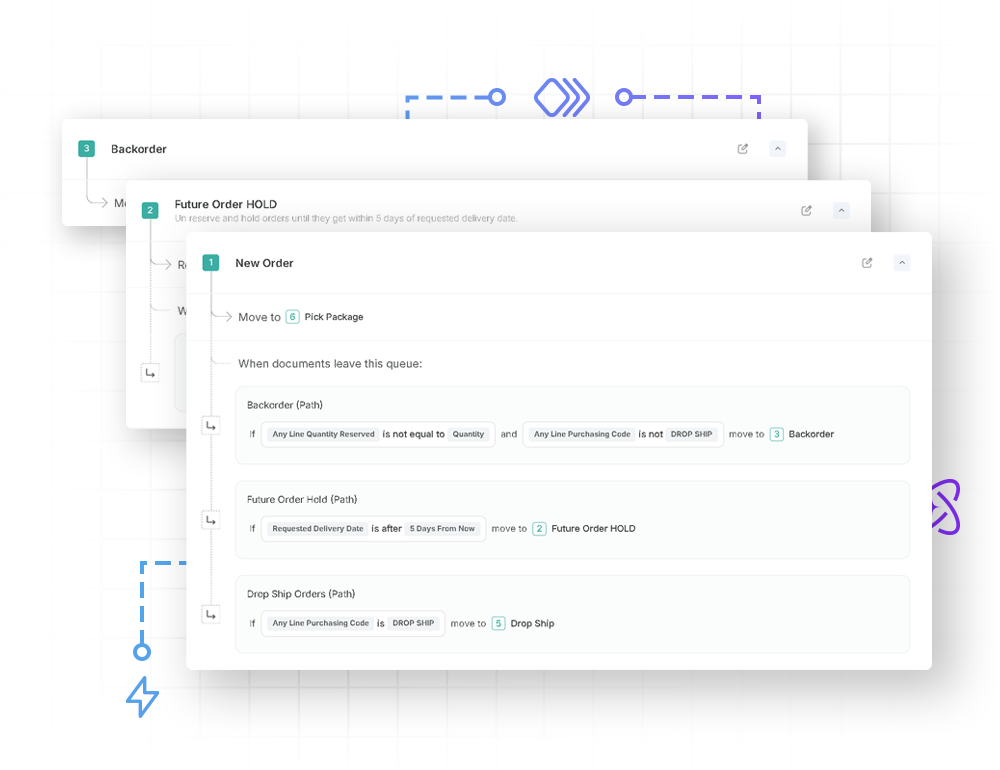

Sales Order Workflows Purpose-Built for Distributors
Automate backorders
Transform manual, order-by-order searches into an automated process that instantly identifies available stock, applies priority rules, and generates pick documents—all without a single click.
Automate inventory reservations
Eliminate “false stockouts” by replacing rigid FIFO reservations with intelligent prioritization—ensuring inventory is always available for customers who need it now, while automatically queuing future shipments for later replenishment.
Single-click drop shipping
Scale drop ship volume without increasing headcount. Replace tedious multi-screen requisitioning with a single-click engine that instantly generates purchase orders and slashes cost-to-serve.
Mission control
Order Visibility
Mission Control displays every step of your sales process and shows exactly which documents are waiting at each stage. Instead of hunting for problems, your team sees at a glance what requires action: approvals pending, orders awaiting verification, documents stalled in any step you’ve defined. Workflows can also notify users automatically when a document meets specific conditions or enters a review queue, reducing the need for constant monitoring.
End the guesswork. See what needs your attention now.
Centralized process visibility
View all your configured workflow steps in one place. Monitor real-time document counts at each step, then drill down into the full list of orders to resolve bottlenecks before they become backlogs.
Real-time alerts
Surface problems the moment they happen. Trigger email notifications the moment an order breaks a rule or meets a certain condition, ensuring nothing slips through the cracks.
Full audit trail
Track every touchpoint, status change, and rule evaluation on each order. Replace guesswork with a definitive history that tracks exactly where, when, and why an order was flagged.

Mission control
Process Automation
Mission Control automates the routine work—generating purchase orders, reserving inventory, processing payments, releasing documents—so orders move through your process without waiting for a manual push. By eliminating these touchpoints, you can reduce repetitive work, slashing delays and accelerating your order-to-cash cycle while processing more orders with your existing headcount.

Increase throughput without adding headcount.
Triggered actions
Automatically execute tasks when an order hits a specific stage—reserve inventory, create pick documents, generate POs, capture payments, send emails, and more—all without manual intervention.
Automated payment capture
Protect your bottom line by automating the full payment lifecycle. From pre-auth at order entry and triggering capture the moment a shipment is posted, you ensure every order is funded and every transaction is settled without manual accounting steps.
Fewer touches, fewer mistakes
Profit scan
Real-Time Margin Protection
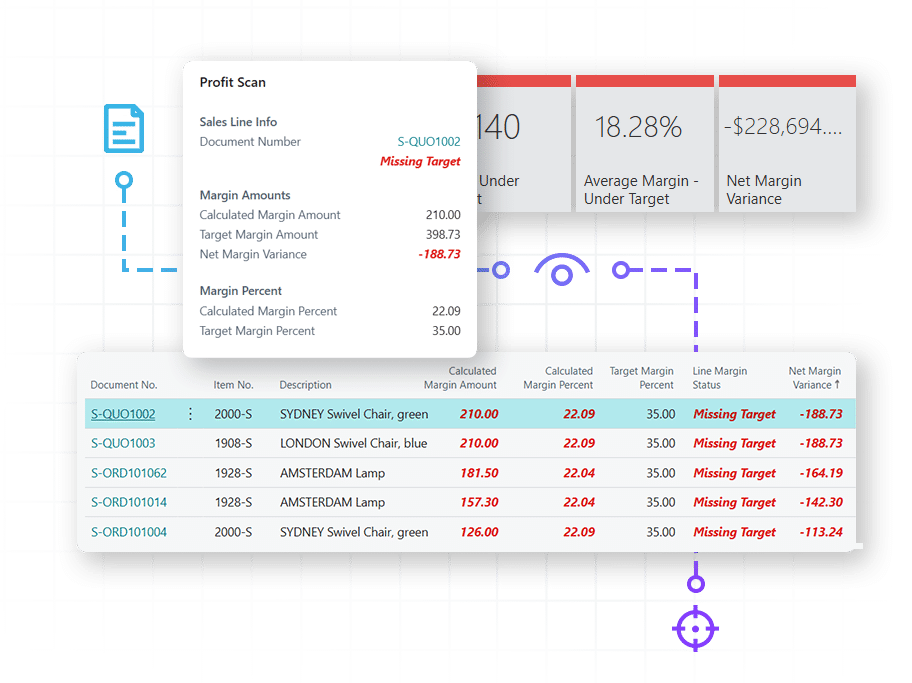
Don’t wait until the end of the month to discover you’ve been selling at a loss. Profit Scan monitors every quote and order against your margin rules—flagging over-discounting, pricing errors, and low-margin deals in real time. Stop selling at a loss without knowing it.
Stop profit leaks before they cost you.
Real-time leak detection
As your team enters orders, any document under your target margin is immediately flagged via color-coded indicators (red, green). This provides instant visibility within your standard Business Central screens, allowing you to correct margin issues before the order is processed.
Configurable margin rules
Protect your bottom line on every quote and order by setting specific margin targets by product line, customer group, or any Business Central dimension. Profit Scan automatically evaluates every document against these rules, feeding directly into your workflow to capture and reroute violations. This ensures no low-margin order is processed without review.
Profitability analytics
Identify which customers, items, or segments are eroding your margins over time. By visualizing these trends, you can pinpoint lost profit and adjust your strategy before small leaks become major financial losses.
customer iq
AI-Powered Customer Insights
Customer IQ combines machine learning powered churn prediction with historical profitability data—giving you the full picture of each account’s value and risk. See which high-value customers need attention to prevent them from leaving, and which low-profit accounts don’t deserve deeper discounts. The right information at the right time leads to better decisions and a healthier bottom line.
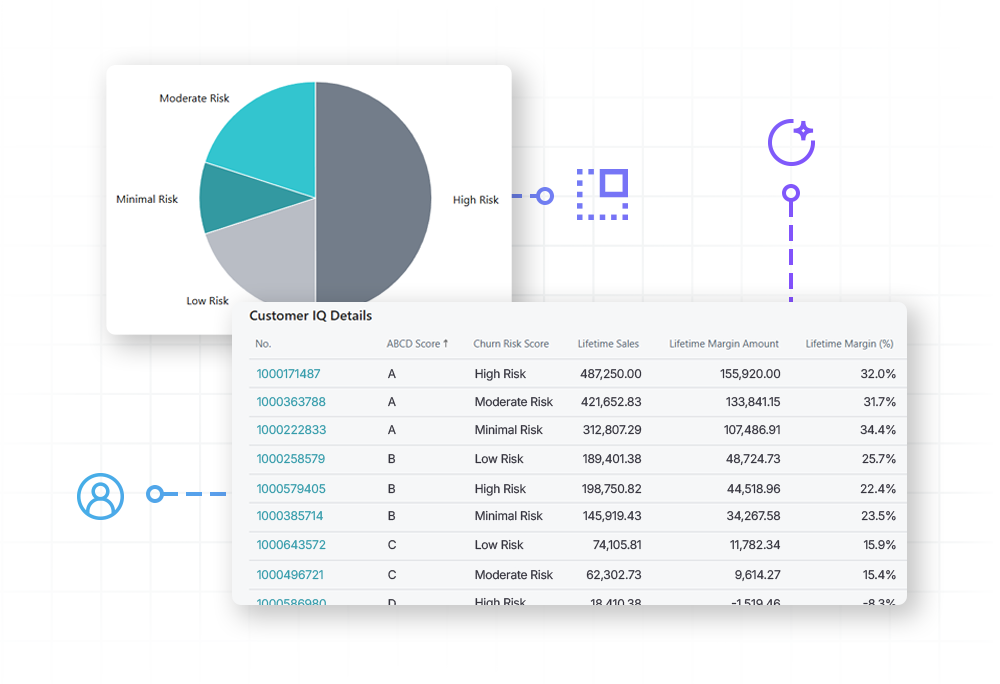
Protect your best customers. Know when to intervene or say no.
Churn prediction
Data science models analyze historical buying patterns to flag accounts showing early signs of risk. Take action—strategic outreach, proactive discounts, priority handling—while there’s still time.
Profitability insights
See each customer’s historical financial value to your business at a glance. Identify which relationships drive growth and which ones are actively eroding your margins.
Profit-based segmentation
Combine risk and value to prioritize your accounts. Protect high-value customers at the first sign of trouble and spend less time chasing accounts that aren’t worth the effort.
Customer Success Story
The Handi-Craft Company
As the manufacturer of Dr. Brown’s baby bottles, Handi-Craft needed a way to manage massive order volumes without losing visibility or increasing overhead. By implementing SalesPad, they replaced manual workarounds with automated, system-enforced workflows that ensure every order moves accurately from entry to fulfillment.
“Since we’ve gone with SalesPad, my job has been easier. I actually have a team of five right now, and if I did not have SalesPad it would be at least seven. Probably eight.”
Gail Perry, Office Manager at The Handi-Craft Company
A Guided Path for Every Stage of your ERP Journey
Whether you are just beginning your migration or looking to optimize an existing environment, SalesPad for BC is designed to scale with your business and provide a clear roadmap for operational excellence.
Already on Business Central?
Stop settling for manual workarounds. Add SalesPad for BC to close process gaps, eliminate rework, and enforce margin rules—all without the cost and delay of custom development.
Current SalesPad Client?
Keep the control you love. We provide a guided path to migrate your proven workflows, business rules, and real-time controls safely into your new Business Central environment. Learn more.
Migrating to Business Central?
Build it right the first time. By embedding strategic intelligence into your implementation from day one, we make your transition to Business Central faster, easier, and significantly less risky.
FAQ
How long does it take to get up and running?
You can begin realizing value in minutes, not months. Because our suite is built as a native extension, tools like Profit Scan and Customer IQ offer near-instant deployment—allowing you to surface margin risks and AI-driven churn insights across Business Central in less than 15 minutes. For deeper orchestration, Mission Control implementation is measured in weeks, rather than months. As a no-code solution, it allows you to begin modeling workflows and enforcing business rules shortly after installation, bypassing the long development cycles and high costs associated with traditional ERP customizations.
How does Mission Control specifically help protect my profit margins?
Mission Control acts as a digital safety net. By setting automated business rules (e.g., “Halt order if margin is below 15%”), you prevent “margin leaks” before they happen. You stop relying on people to catch errors and start relying on a system that refuses to process a non-profitable or non-compliant order.
Can I use my existing Business Central data and custom fields to trigger workflows?
Can Mission Control handle high order volumes?
Can I set different margin targets for different types of products?
What happens if an order falls below my margin target?
Instant visual feedback appears directly on your Business Central sales documents the moment a threshold is breached. Profit Scan surfaces clear alerts—such as a red “negative” or “missing target” status. For proactive protection, Profit Scan and Mission Control work in tandem: a configurable business rule can automatically block any order missing its target, preventing it from being processed and instantly routing it for mandatory review and approval.